
Xerox Duplex Portable 2.0 Scanner
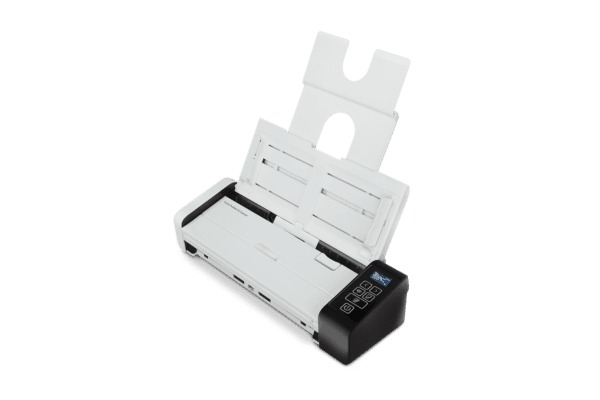
- Scan speeds up to 30 ppm / 60 ipm at 300 dpi
- 50-sheet ADF with ultrasonic double feed detection
- USB, WiFi and Gigabit Ethernet connectivity
- Mac and PC compatible, mobile-ready for Android & iOS
- Scan to cloud, apps or specific folders
- Compact footprint with collapsible trays
Abstract
The Xerox Duplex Portable 2.0 packs a 50-sheet automatic document feeder and 30 ppm / 60 ipm duplex scanning at 300 dpi into a body that folds down to 11.8 x 4.1 x 2.9 in and 3.3 lb. It is aimed at mobile professionals, small and medium businesses and home offices that need a real feeder rather than a single-sheet travel scanner. All three connections are built in — USB 2.0, WiFi 802.11 b/g/n and Gigabit Ethernet — so the same scanner works cabled at a desk, wireless at a client site, or shared on an office network, with a 3,500-page recommended daily duty cycle behind it.
Product Description
Portable Without the CompromiseTravel scanners usually mean feeding one page at a time. The Duplex Portable 2.0 keeps a 50-sheet feeder and ultrasonic double-feed detection, then collapses to roughly the footprint of a laptop when the job is done.
Connect Three WaysUSB 2.0, WiFi 802.11 b/g/n and Gigabit Ethernet are all standard. Scans go to a folder, an application, an email address or a cloud service, and Visioneer Mobile Capture drives the scanner directly from Android and iOS devices.
Media and OutputThe feeder takes 7 to 110 lb. paper, photos, receipts and plastic or embossed ID cards up to 0.05 in, with originals from 2.25 x 2 in up to 8.5 x 118 in. Output formats include searchable PDF, multi-page PDF and TIFF, JPEG, PNG, BMP, GIF, XPS, RTF, TXT, HTML and Microsoft Office DOC, XLS, PPT, DOCX, XLSX and PPTX.
Software IncludedVisioneer OneTouch and Visioneer Organizer AI handle one-click workflows and automatic file classification; ABBYY FineReader PDF and ABBYY Business Card Reader cover OCR, PDF editing and card capture.
Specifications
- Speed @ 300 dpi, b&w, grayscale, or color: 30 ppm / 60 ipm
- Simplex or Duplex: Duplex (two-side scanning)
- ADF Capacity: 50 sheets (20 lb., 75-80 g/m2 paper)
- Recommended Daily Duty Cycle: 3,500 pages
- Double-Feed Detection: Ultrasonic
- Optical Resolution: 600 dpi
- Output Resolution: 1200 dpi
- Output Bit Depth: 24-bit color, 8-bit grayscale, 1-bit black & white
- Imaging Sensor: Dual CIS (front & back)
- Light Source: LED
- Interface: USB 2.0, WiFi 802.11 b/g/n, Gigabit Ethernet
- Minimum Document Size: 2.25 x 2 in (57 x 51 mm)
- Maximum Document Size: 8.5 x 118 in (216 x 3000 mm)
- Paper Thickness Range: 7 - 110 lb. (27 - 413 g/m2)
- Maximum Card Thickness: 0.05 in (1.25 mm)
- Scanning Media Supported: Paper, plastic ID cards, photos, receipts
- Dimensions (trays collapsed): 11.8 x 4.1 x 2.9 in (299 x 104 x 74 mm)
- Dimensions (trays expanded): 11.8 x 10 x 10 in (299 x 255 x 255 mm)
- Weight: 3.3 lb. (1.5 kg)
- Supported Operating Systems: Windows 11, 10, 7; macOS 11 and later
- Supported Drivers: TWAIN, WIA, ICA, SANE
What's in the Box
- Xerox Duplex Portable 2.0 Scanner
- Power supply and adapter
- USB cable
- Network cable
- Quick Install guide
- Warranty and Registration cards
- Included software (download)
Included Software
Windows- Visioneer OneTouch
- Visioneer Organizer AI
- ABBYY FineReader PDF
- ABBYY Business Card Reader
- Visioneer Scan Utility
- ABBYY FineReader PDF
System Requirements
Xerox Duplex Portable 2.0 Scanner PC Requirements- Intel i3 or equivalent CPU
- Internet access (for installation)
- An available Universal Serial Bus (USB) port
- Microsoft Windows operating system: 32-bit or 64-bit Windows 7 (Service Pack 1), 8 / 8.1, 10 or 11
- Minimum of 2 gigabyte (GB) of internal memory (RAM)
- Minimum available hard disk space: 350 MB for the scanner driver, 1 GB for Visioneer OneTouch, 1 to 3 GB for each additional application
- Intel i3 or equivalent CPU
- Internet access (for installation)
- An available Universal Serial Bus (USB) port
- Apple macOS 10.14 or later
- Minimum of 2 gigabyte (GB) of internal memory (RAM)
- Minimum available hard disk space: 350 MB for the scanner driver